
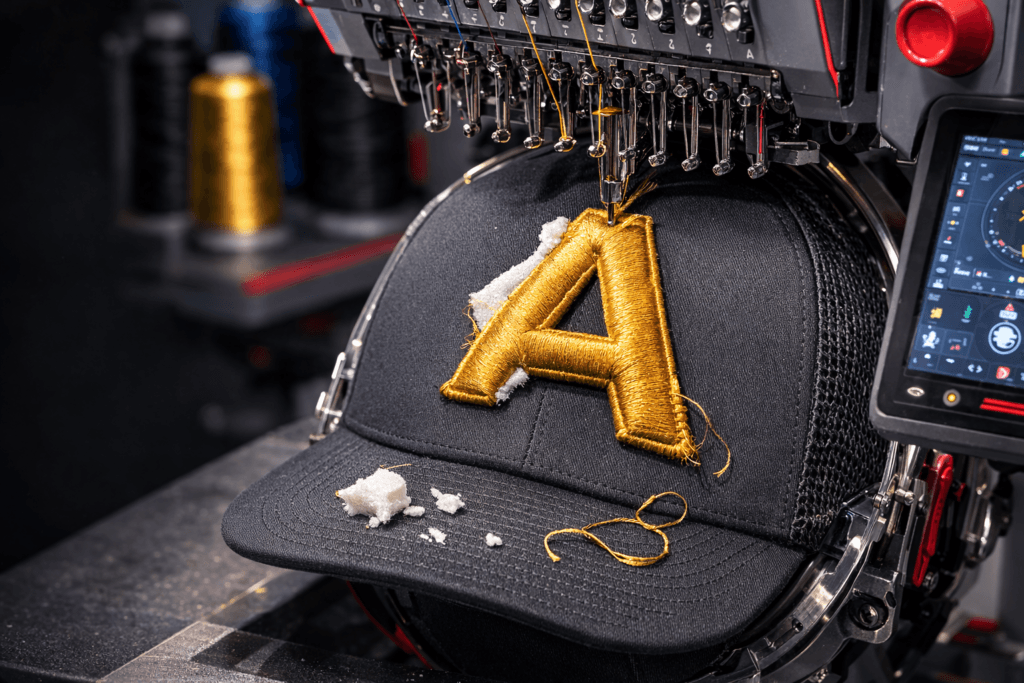
3D puff embroidery is one of the most eye-catching techniques used on hats, especially trucker caps and structured snapbacks. The raised foam effect creates bold logos that stand out and add depth to embroidery.
However, achieving clean results requires proper digitizing, correct machine settings, and attention to detail. Many embroidery issues happen not because of the machine, but because small steps are skipped during digitizing or setup.
At W88 Prime Wear, we frequently work with clients who need help fixing designs that were originally digitized incorrectly for puff embroidery. In many cases, the same problems appear repeatedly, and most of them are related to common 3D puff embroidery mistakes made during digitizing or machine setup.
If you are new to this technique, we recommend reading our complete guide to 3D puff embroidery, where we explain digitizing, machine setup, and structured caps step by step.
3D Puff Embroidery Guide: Digitizing, Machine Setup, and Structured Cap Tips
Below are the 7 most common mistakes in 3D puff embroidery and practical ways to avoid them.
1. Not Using a Run Stitch to Secure the Foam
One of the most common mistakes happens before the main embroidery even begins.
Some digitizers rely only on tape or rubber bands to hold the foam in place. While these can help temporarily, the movement of the embroidery machine can cause the foam to shift slightly.
When the foam moves, the satin stitches may no longer align properly with the design.
How to Fix It
Always add a run stitch placement line before the satin stitch layer.
This stitch does not need to be perfect. Its only job is to secure the foam and prevent movement during embroidery.
Example:
If the design is the letter “A”, adding a run stitch inside the center area of the letter helps stabilize the foam before the main stitching begins.
If you want to see a real example of this process, including run stitch, cap stitch, satin stitch, and foam finishing, watch the video below. Click Here…
2. Forgetting to Remove the Underlayer
Another frequent issue appears during digitizing.
In standard embroidery, underlay stitches help stabilize the fabric before the top stitches are applied. However, in 3D puff embroidery, the foam already provides structure.
If the underlayer remains active, the machine may pull the stitches too tightly, which is one of the most common 3D puff embroidery mistakes beginners make.
What Happens When Underlay Is Left On
• Foam does not expand properly
• The puff effect becomes flat
• Stitches appear compressed
How to Fix It
For the foam layer, remove the underlay completely.
This allows the satin stitches to sit on top of the foam and create the proper raised effect.
3. Not Creating Caps on Open Stitch Ends
This mistake usually appears when digitizing letters or shapes with open stitch columns.
For example, consider the letter “A”.
Depending on how the satin columns start and end, the bottom of the letter may leave two open stitch gaps.
When this happens, the foam underneath may become visible or even start pushing out of the embroidery. This is another example of 3D puff embroidery mistakes caused by incorrect digitizing technique.
How to Fix It
Create caps on open stitch ends.
Caps are small stitches placed at the ends of satin columns to seal the foam inside the embroidery shape.
These stitches help:
• lock the foam in place
• prevent foam from showing
• create a cleaner finish
4. Using the Wrong Foam Color
This mistake seems simple, but it can affect the final appearance of the embroidery.
Even when the stitch density is correct, tiny pieces of foam can sometimes remain visible between stitches.
If the foam color is different from the thread color, those small areas will stand out immediately.
This is one of the easiest 3D puff embroidery mistakes to avoid, but it still happens very often.
Example
Thread color: Black
Foam color: White
Any small exposed foam pieces will be clearly visible.
How to Fix It
Always use foam that matches the thread color.
Matching colors ensures that even if small foam fragments remain visible, they blend naturally with the embroidery.
5. Incorrect Satin Stitch Density
Proper stitch density is extremely important for 3D puff embroidery coverage.
If the density is too low, the satin stitches will not cover the foam completely.
This can cause:
• foam showing between stitches
• uneven puff effect
• weak stitch structure
Many 3D puff embroidery mistakes are related to wrong density settings.
Recommended Density
Many 3D puff embroidery mistakes are related to wrong density settings.
For most puff embroidery designs:
0.18 mm – 0.20 mm satin stitch density
This density adds enough stitches to fully cover the foam while maintaining a smooth appearance.
6. Creating Designs That Are Too Large
When embroidering on hats, design size is limited by the curved surface of the cap.
Many beginners digitize designs that are too tall for the front panel.
This causes alignment problems during embroidery.
Recommended Maximum Height
2.5 inches
Keeping the design within this range helps avoid 3D puff embroidery mistakes related to misalignment and distortion.
7. Running the Machine Too Fast
Speed is another common issue.
Many embroidery machines can run at 1,000 stitches per minute, and beginners often try to run puff embroidery at maximum speed.
However, puff embroidery involves stitching through:
• the hat fabric
• stabilizer
• foam
This creates a much thicker material stack than standard embroidery.
Running too fast can cause:
• needle breakage
• thread snapping
• uneven stitches
Recommended Speed
For most 3D puff designs:
~600 stitches per minute
Running the machine slightly slower improves stitch quality and reduces mechanical stress, helping you avoid common 3D puff embroidery mistakes.
Quick Reference Table
| Mistake | Result | Solution |
|---|---|---|
| No run stitch | Foam shifts during embroidery | Add placement run stitch |
| Underlayer left active | Puff effect becomes flat | Remove underlayer |
| No caps on stitch ends | Foam visible on edges | Add stitch caps |
| Different foam color | Foam shows through | Match foam and thread |
| Low stitch density | Foam visible between stitches | Use 0.18–0.20 density |
| Design too large | Alignment issues | Keep height under 2.5 inches |
| Machine running too fast | Thread breaks / needle breaks | Run ~600 SPM |
Professional 3D Puff Embroidery and Digitizing
If you are struggling with puff embroidery results, professional digitizing can make a huge difference.
At W88 Prime Wear, we provide:
• professional 3D puff embroidery digitizing
• custom hat embroidery
• high-quality service embroidery for businesses and brands
• fast turnaround for embroidery files
CTA
Want to learn more embroidery techniques and avoid costly mistakes?
Follow the W88 Prime Wear blog for expert tips on digitizing, embroidery setup, and custom apparel production.
Or contact us if you need professional embroidery digitizing or service embroidery for your next project.





![Tribal Skull Warrior – T-Shirt [warrior spirit]](https://w88primewear.com/wp-content/uploads/2025/08/WJD-L-000008-T-1-300x450.jpg)